Help Center
Go back to application
Help Center
Go back to application
Getting Started
Getting started with Evolved Office
How to Get Started
How to Set Up Email Authentication in Evolved Office (SPF, DKIM)
How to Upload Contacts into Evolved Office: Create a List, Map Fields & Import
How to Connect Social Media Accounts to EOSocial (Facebook, LinkedIn, Instagram & More)
How to Add CNAME Records for SPF & DKIM by DNS Provider (GoDaddy, Cloudflare & More) | Evolved Office
Dashboard / Reporting
How to View Email Campaign Stats in Evolved Office (Opens, Clicks, Bounces & More)
How to Use the Lead Scoring Dashboard in Evolved Office (Track, Score & Prioritize Leads)
Contact List
How to Upload Contacts into Evolved Office: Create a List, Map Fields & Import
How to Add Contacts to an Existing List in Evolved Office (Manual, Upload, or Segment)
How to Export a Contact List in Evolved Office (Download as CSV)
How to Assign or Share a Contact List with a User in Evolved Office
How to Combine or Merge Contact Lists in Evolved Office
How to Rename or Edit a Contact List in Evolved Office
How to Create a New Contact List in Evolved Office (and Add Contacts)
How to Remove or Delete a Contact from a Contact List in Evolved Office (Manage Subscriptions)
How to Edit or Update a Contact's Information in Evolved Office
How to Manually Unsubscribe a Contact from Emails in Evolved Office
How to Delete a Contact in Evolved Office (Single or Multiple)
Managing User Accounts
How to Add a New User to Evolved Office (Set Permissions & Feature Access)
How to Upload or Update My Profile Photo in Evolved Office
How to Reset Another User's Password in Evolved Office (Admin)
How to Edit or Update a User's Details in Evolved Office (Admin)
How to Change My Own Username or Password in Evolved Office
How to Update My Personal Information in Evolved Office (Name, Email & Username)
How to Delete a User from Evolved Office (Admin)
Notifications
How to Turn On Lead Scoring Alerts in Evolved Office (Email Notifications)
How to Manage Email Broadcast Stats Notifications in Evolved Office (Enable, Disable & Add Recipients)
How to Turn On Email Broadcast Stats Notifications in Evolved Office
Company Information and Branding
How to Edit or Update an Email Footer in Evolved Office (Branding Settings)
How to Upload or Update Your Company Logo in Evolved Office (Branding Settings)
How to Update Your Company Information in Evolved Office (Name, Address & Contact Details)
How to Add or Manage Alternate Contacts in Evolved Office (Company Info Settings)
How to Change Your Brand Colors in Evolved Office (Branding Settings)
How to Set a Default Email Header or Footer in Evolved Office (Branding Settings)
How to Upload a Custom Email Header or Footer Image in Evolved Office (Branding Settings)
How to Add Additional Locations or Branches in Evolved Office (Company Info Settings)
How to Add or Edit a Branch Location in Evolved Office (Company Info Settings)
How to Edit Your Landing Page Footer in Evolved Office (Branding Settings)
How to Add Your Social Media Profile URLs in Evolved Office (Branding Settings)
How to Add Brands and Vendors to Your Evolved Office Product Library
Newsletter/eSHOTs
Creating and Structuring Your Email
The Complete Guide to Creating an eSHOT in Evolved Office (Step-by-Step)
Email Campaign Best Practices in Evolved Office (Subject Lines, Personalization, CTAs & More)
How to Start a New eSHOT in Evolved Office (Quick Start)
How to Create a Newsletter in Evolved Office
How to Find and Use eSHOT Templates by Category in Evolved Office
How to Add Structures to Your eSHOT or Newsletter in Evolved Office
How to Save, Use, and Delete Favorite Structures in Evolved Office
How to Add and Manage Category Tags in Your Evolved Office Email Campaigns
Adding and Customizing Content
How to Add Articles and Products to Your eSHOT or Newsletter in Evolved Office
How to Edit Articles and Products Directly in the Evolved Office eSHOT/Newsletter Editor
How to Resize and Insert Images into Your eSHOT or Newsletter in Evolved Office
How to Resize and Add an Animated GIF to Your eSHOT or Newsletter in Evolved Office
How to Replace an Email Header or Footer in the Evolved Office eSHOT Editor
How to Attach or Link a PDF or Document to a Button or Image in Evolved Office
How to Add or Insert Variable Contact Data to Your Email in Evolved Office (First Name, Company & More)
How to Add Clickable Social Media Icons to Your eSHOT or Newsletter in Evolved Office
How to Configure Button Actions in the Evolved Office Email Editor (Links, Email, Call & More)
Formatting and Design
How to Stylize Text
How to Adjust Button Width for Optimal Design
How to Change the Background Color of a Structure
How to Convert a PDF and Upload It as an Image in Your Campaign
How to Set Up Auto-Populated Email Links for 'Contact Us' Buttons or Text
Outlook White Lines: Design Standards & Solutions
Testing and Sending Emails
Sending a One-Off Email in eSHOT
How to Preview Your Newsletter/eSHOT
How to Send a Test Email
How to Schedule and Send a Broadcast Email
How to Cancel a Scheduled Broadcast Email
eoJourney: Mastering Drip Campaigns
Comprehensive Guide: Creating a Journey and Multi-Rep Journey with Multi-Assign Feature
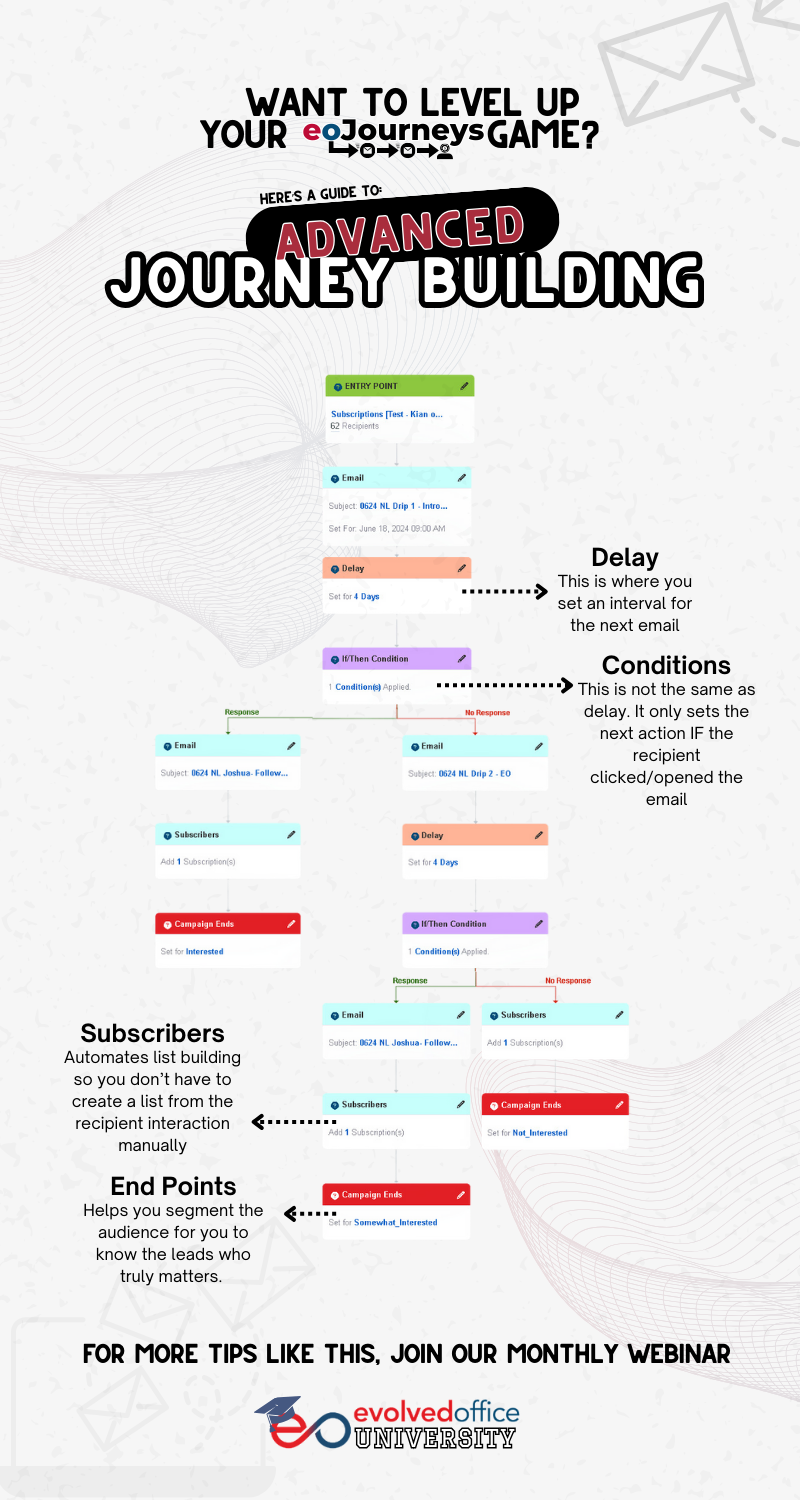
Guide to Advanced Journey Building
Understanding Rules and Actions for Creating Journey or a Drip Campaign
How to Create Rep Segments in Journey List Management
Suggested Journeys: How to Launch a Prebuilt Drip Campaign
How to Change or Edit an Email (eShot) in the Journey Manager
How to Use Journey Tracking in Evolved Office (Stats, Points & Recipient Insights)
eoScribe: EO's Powerful AI-Driven Assistant
Getting Started with eoScribe: Evolved Office's AI-Powered Marketing Assistant
eoScribe in Creating an Article
Understanding Article Prompts: Maximizing Your eoScribe Experience
eoScribe in Creating an Email
Understanding Email Prompts: Maximizing Your eoScribe Experience
eoScribe in Creating an eSHOT
Understanding eSHOT Prompts: Maximizing Your eoScribe Experience
How to Use eoScribe for Creating Targeted Email Campaigns
eoScribe in Creating a Newsletter
Understanding Newsletter Prompts: Maximizing Your eoScribe Experience
eoScribe in Creating Social Media Post
Understanding Social Media Prompts: Maximizing Your eoScribe Experience
eoScribe in Creating an Image
Understanding Graphics Prompts: Maximizing Your eoScribe Experience
eoSocial: Streamline Your Social Strategy
eoSocial Quick Start: Sign In, Connect Profiles, Create Posts, and Manage Engagement
99 Reasons to Use eoSocial
Adding Profiles
How to Reconnect Your LinkedIn Profile: Preparing for LinkedIn's Community Management API Changes
Add a LinkedIn Profile
Add a LinkedIn Company Page to EOSocial
Add a Facebook Page profile
Set up geotargeting for a Facebook Fan Page
Add Instagram Business profile(s)
Add a Twitter profile to EOSocial
Add social profiles to EOSocial
Can I add multiple social profiles to the same user account on EOSocial?
Create and manage Profile Lists
Edit and delete existing profiles
Posting Messages
How to Schedule Social Media Posts Using eoSocial
Post an Instagram Story or carousel post
What are Optimal Times and how are these calculated?
What are the sending limits for my account?
Can I delete posts on my social profile from EOSocial?
Create Profile Lists
Can I Delete a Post After It’s Published?
Add UTM tracking to links
How to Measure Social Media ROI Using UTM Links
How to Schedule Social Media Posts Using eoSocial (Updated for EO Content)
How to Use Queues in eoSocial
How to Use Campaigns in eoSocial
Using EO Content in eoSocial: Share Ready-to-Go Posts, Edit with AI, or Create New Posts
Creating Content
Overview of Campaigns
Bulk import messages
Post native videos to LinkedIn Company Pages
Can I access images that I've created on Canva?
Create content with Canva
Include emojis in posts
Add an Instagram geolocation tag to posts
View and use the calendar
Include an @ tag in a post
Using RSS Feeds
Troubleshoot an RSS feed
Checking and posting updates for an RSS feed
Add an RSS feed
Composing Messages
How can I select a thumbnail for my video post?
Attach and send videos
Video requirements for each social platform
Work with images in the Compose Box
Work with videos in the Compose Box
Using EO Content in eoSocial: Share Ready-to-Go Posts, Edit with AI, or Create New Posts
Activity
Reply to a message
View Social Feeds
How can I view a conversation?
Will Instagram notifications appear in the Priority Inbox?
View, archive, and restore Priority Inbox messages
Priority Inbox
Collaborating / Approvals
Set up custom fields
Manage notifications
Pause scheduled messages
Send messages for approval
Work with approval tasks and assigned messages
Reporting
Export report data as a CSV or HTML file
Best practices: Download reporting data
Reports glossary
Quick Reports
Create a custom report
Overview of Campaign reports
How to Use Campaign Reports in eoSocial
Settings
Set up custom fields
Manage notifications
Pause scheduled messages
Troubleshooting
What troubleshooting steps can I try if something's not working as it should?
What can I try if I'm not able to add an Instagram profile?
Reconnect a Twitter profile
Reconnect a LinkedIn profile
Best practices: LinkedIn posting limits
Revoke and reconnect a LinkedIn profile
Why are my images cropped either side when posting to Linkedin Profiles?
Instagram undelivered error messages
Reconnect Instagram Business profile(s)
Why is my Instagram account not appearing when I try to (re)connect it?
What can I try if I'm having trouble with Facebook geotargeting?
Reconnect a Facebook Page profile
What can I try if I'm not able to add a Facebook profile?
Why is my Facebook Page not appearing when I try to (re)connect it?
What can I do if the emojis in my post don't appear correctly?
Delete duplicate profiles
What can I try if I'm having trouble with a social profile?
Remove or revoke EOSocial's access to social sites
Why are my messages being sent at incorrect times?
Why do images look different when posted through EOSocial?
Where should I check if my message hasn't been posted?
What does "No profiles selected" on scheduled or sent messages mean?
Article Tools
Managing Your Articles: Viewing, Adding, and Editing Content
Video Messaging
The Power of Personalized Video Messaging with eoVideo
Quick Guide on How to Shoot a Video
How to Edit a Video in eoVideo
Understanding Video Libraries in Your Account
How to Easily Add eoVideo to Your Bookmark Bar
How to Upload and Customize Videos: A Step-by-Step Guide
How to Instantly Share Video Messages on Social Media
How to Upload or Update a Custom Thumbnail in the Video Editor
How to Allow Microphone/Camera Access for eoVideo Recording
Canva Integration in Evolved Office
Getting Started with Canva Integration in Evolved Office
How to Edit an Image with Canva from the Asset Manager
How to Edit an Image in an Email Template with Canva
How to Edit an Image in an Article with Canva
How to Edit a Product Image with Canva in Evolved Office
How to Edit a Social Media Image with Canva
How to Create a New Design in Canva with Evolved Office
How to Browse Your Evolved Office Library from Within Canva
How to Edit a Video with Canva from the Asset Manager
How to Edit a Video with Canva from the Video Library
How to Edit a Video with Canva from the Video Landing Page Editor
Digital Hub
Digital Hub: Your All-in-One Analytics Dashboard
Digital Hub Integrations Guide
Reports: Generate and Manage Custom Reports in Digital Hub
Form Creation & Management
How to Create Forms
Product Library
How to Add and Manage Products in the Evolved Office Product Library (My Products)
Managing Product Visibility in Your Product Library (I-Frame Version)
CRM Integrations with Evolved Office
Agent Dealer Integration
How to Use Evolved Office and AgentDealer Integration
Evolved Office + AgentDealer Integration: Admin Setup & Configuration Guide
How to Use and Edit eSHOTs in the Rep Window for AgentDealer x Evolved Office Integration
AgentDealer Integration: Verify Your Evolved Office Setup
SalesChain Integration
How to Use Evolved Office and SalesChain Integration
How to Use and Edit eSHOTs in the Rep Window for SalesChain x Evolved Office Integration
Compass Sherpa Integration
How to Use Evolved Office and Compass Sherpa Integration
EO University
EO University - Collection of In-depth Webinars and Trainings
eoMasterclass
The Power of Personalized Video Messaging
Unlock Customer Loyalty: Master Personalized Video Messaging with eoVideo
Mastering eoJourney: Elevate and Automate Your Campaigns with Drip Campaigns
Marketing Mastery
Mastering AI Commands
Making AI Your Creative Co-Pilot
Diverse Perspectives
The Power of Integration: Mastering Next-Gen Marketing with SalesChain and Evolved Office
Fearless Upselling: Unleash the Power of Content Automation and AgentDealer to Crush Your Competitors
Trend Watch
AI and the Future of Sales & Marketing for Business Technology Resellers - A Roundtable Discussion
Guide to Advanced Journey Building
Was this article helpful?
😁
😐
😠