
Sending a One-Off Email in eSHOT
One-Off sending allows you to send a single eSHOT to an individual contact or small group of contacts without creating a full broadcast campaign. This is ideal for personalized outreach, quick follow-ups, or sharing content directly with a prospect.
Where to Access One-Off Sending
One-Off sending is currently available under the Edited / Shared tab inside the eSHOT tool.
To access:
- Go to eSHOT
- Click Edited / Shared
- Select the template you want to send
- Click the Preview icon
- From the Preview window, click the One-Off Send icon (black envelope icon)
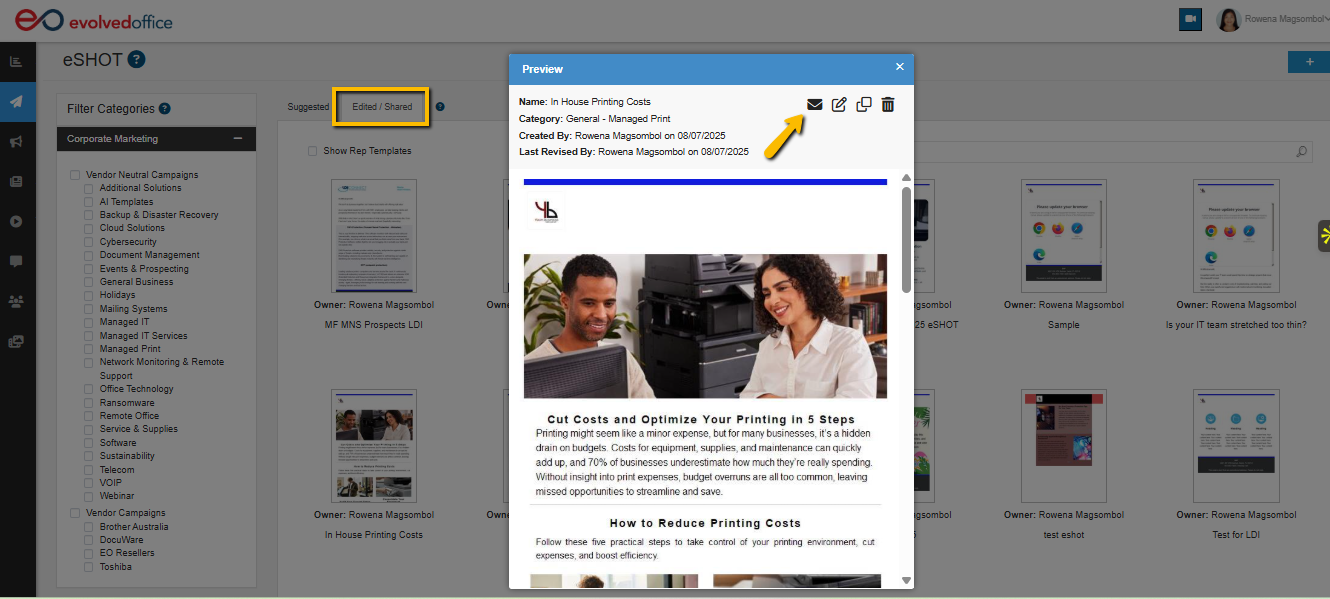
Sending a One-Off Email
Once the One-Off window opens, follow these steps:
1. Set Sender Information
- From Name
- From Email
These determine how the email appears in the recipient’s inbox.
2. Add Email Metadata
Enter:
- Subject Line
- Pre-Header
These improve open rates and preview text in most email clients.
3. Choose Recipients
One-Off sending provides two methods:
Option A — Select Existing Contacts
Use the search bar to pull contacts from your CRM sync.
Option B — Send to External Contacts
Enter external emails separated by semicolons (;)
Tip: This is useful when emailing prospects who are not yet stored as contacts.
4. Review the Email Content
The template will display below for final review.
You may:
- Make edits
- Adjust formatting
- Insert merge tags (e.g., name, company)
- Confirm links
5. Send the One-Off
Click Send One-Off to immediately deliver the email to your selected contacts.
Best Use Cases
One-Off sends are ideal for:
- New lead outreach
- Post-meeting follow-ups
- Sending content on behalf of reps
- Reviewing content internally
- Quick one-time touchpoints
Notes
- One-Off sends do not create a campaign
- External contacts are not automatically added to CRM
- Engagement tracking still applies (opens/clicks)